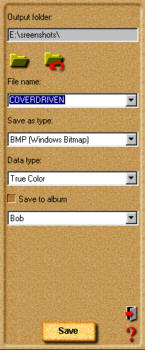
Click the share button on the Command panel. The Toolbar will display the different Share tools.
Click the Save button on the Toolbar. The Save options will appear in the Options panel.
In the Save options box, enter the location, name, file type and data type.
Select an album from the "Save to album" drop-down menu and click Save, or go to File, Save and then select the location, name, file type, and data type and click Save.









 The Toolbar will display the different Share tools.
  The Save options will appear in the Options panel.