| |   | | | Attaching Pictures to E-mail Even though the Scan Dialog Box program has an e-mail function, there will be times when it is necessary to attach images to e-mails the "old fashioned" way. Usually these steps are necessary when the e-mail service doesn’t use an SMTP address (like America Online) or when the Scan Dialog Box is unable to properly connect through the mail server. E-mail Basics Part One – Scanning the Image and Saving It Part Two – How to Attach Files With Several Popular E-mail Services
Outlook Express - Choose Compose from the menu.
- In the Compose Message window, enter the appropriate information in the "To," "Subject" and "Message" areas.
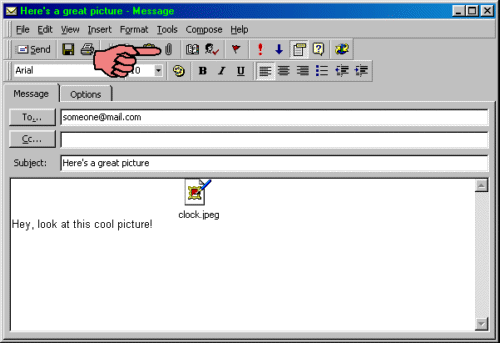
- Click the Insert File button near the center of the upper toolbar.
 - Browse through the drives and directory folders until the desired file is found. Highlight the file and click Open.
- The attached file appears as an icon in the message area. Click the Send button to send the e-mail.
| | | |