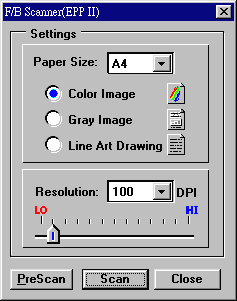
The F/B Scanner dialog box (Twain driver) is where you setup your scanner and perform the scanning and enhancement functions.Setting up the scanner involves adjusting the imagesize, scan mode, and scanningresolution.
Color Image: In this scan mode,the scanner captures 24 bits of color image information for every dot scanned.A 24-bit image is capableof showing 16.7 million colors.This mode is oftenreferred to as True Color.
Gray Image: Grayscale scanningproduces an image with up to 256 shades of gray. Required disk space forsaving grayscale images is only 1/3 that of 24-Bit Color.
Line Art Drawing : This scan modeis best used for tasks such as scanning text for conversion to word processingformats(OCR) or black-and white art work with no color or shading.
Resolution : Resolution is a mearsureof how much image detail information the scanner is to capture in a scan.