 | Document # 6522 |
        |
123 Error Message |
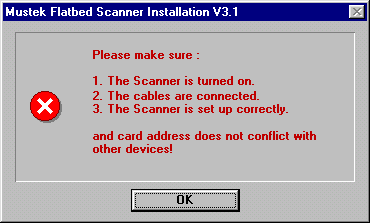 This version of the message usually appears during installation of aTwain driver or the Scanner Solutions CD right after you select the MustekInterface Card. Check the following things: 1. Make sure the SCSI interface card is fully seated across the entirelength of the slot. The card must be inserted into an ISA slot in yourcomputer. ISA slots are made of black plastic. The white slots on yourmotherboard are PCI slots. The Mustek card will not even fit in a PCI slot. 2. Make sure you are using the original cable that shipped with thescanner. Do not add any extensions to the cable. The Mustek cable has the# 20276 printed on the side of it. You should also check both ends of thecable to make sure none of the pins are broken or bent. 3. If you are using an AZ SCSI Card, it will have a threeposition dip switch that allows you to set an address for the card. Tryall eight addresses making sure to turn off the computer before changingthe switch. 4. If you have a DTC-3181A SCSI Card, make sure the Jumper at J1has been removed. If you have a DTC-3181E SCSI Card, DO NOT REMOVE theJumper at J1. If the instructions said to remove J1, put it back. J2 shouldbe removed from the DTC 3181E-SCSI Card. 5. Make sure you have the latest driver. Click the Driver Tab at thetop of this page and download the latest driver. If you download SP35.EXE,you will need to know which SCSI Card you have when you install it.If you have an AZ Card, during installation you should check the MustekCard option. If you have a DTC 3181A or 3181E, check that option. Do notcheck the DTC 3151 option because that card only ships in Europe. 6. If you are using Windows 95 and none of the above things allow installationof the Twain driver, boot your computer in Safe Mode and attempt to installthe Twain Driver. To boot in Safe Mode, look for a message that says "StartingWindows 95…" during reboot. When you see the message, press theF8 key on your keyboard. This will display a menu. Choose option #3 SafeMode and press the enter key. Be patient because it will take longer toboot than normal. If none of the above steps solve your problem, Call our Technical Support Department. |
| Mustek and the Mustek logo are trademarks and registered trademarksof Mustek, Incorporated. Any use without the express written permissionof Mustek is forbidden. Other company and product names may be trademarksor registered trademarks. |