 | Document # 6040 |
        |
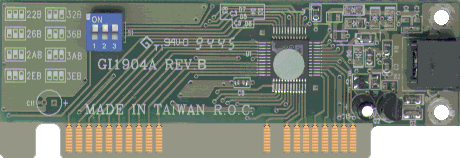
Installing Hand ScannersMustek Hand Scanners require several of your computer’s resources tooperate. The requirement for some resources is inherent to the interfacecard you are using while others are inherent to the Twain driver beingused. Here are the resources typical to all hand scanner, though some ofours do not use all of these resources: Input/Output AddressThe I/O address is used by the computer to communicate with the scanner.Through the address, the Twain driver can wake the scanner up and turnit’s lamp on. All Mustek interface cards require one of the following eightI/O addresses to be available on your computer: 22B, 26B, 2AB, 2EB, 32B,36B, 3AB or 3EB. Most of the cards have a blue switch box which is usedto set the address. When all three switches are up, the address is setto 3EB. There is a diagram printed right on the card showing this. Direct Memory Access ChannelMany Mustek hand scanners use a DMA channel to send the image datadirectly to your computer’s memory. They can only use DMA 1 or DMA 3.Many Sound Cards use both of these DMAs already, so you may not be ableto get the scanner working. This is a common problem on the following brandsof computer: Acer, Compaq Presario, IBM Aptiva, and Packard Bell.It also may be a problem on many clone computers. If you have one of the brands listed above or suspect that DMAs 1and 3 are not available in your computer, contact our Technical Support Department. If we determine that a DMA channel is not available wemay be able to send you an IF-980 interface card which does not need aDMA channel. If you have a clone computer with a Plug-n-Play sound card which yoususpect is using DMAs 1 and 3, remove the sound card from the computerbefore installing the hand scanner. You will also need to delete the soundcard from the Windows 95 Device Manager. Once the scanner is installedand working, re-install the sound card and Windows 95 will assign it adifferent DMA channel. Interrupt RequestThe requirement for an IRQ is inherent to the scanner’s Twain driver.The latest drivers do not require an IRQ. When installing the Twain driver,the configuration setting screen will say IRQ Level "Not Used"if you have the latest driver (See picture below). If the installationscreen always shows an IRQ Level, you have an outdated driver. Go to ourDrivers Page to get the latest hand scannerTwain driver. GI-1904 Interface CardThis card has an I/O address switch. It requires DMA 1 or 3.
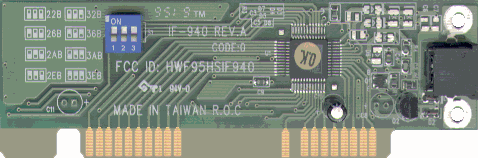
IF-940 Interface CardThis card has an I/O address switch. It requires DMA 1 or 3.
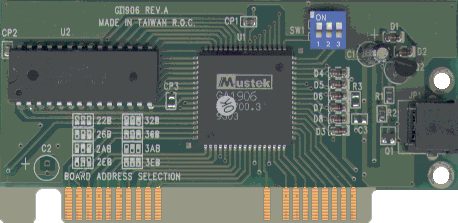
GI-1906 Interface CardThis card has an I/O address switch. It does not require a DMA
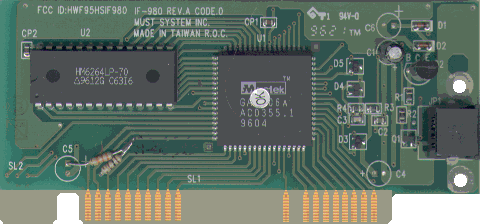
IF-980 Interface Card |
This card does not have an I/O address switch. The I/O addressswitch is set on your computer monitor during installation of the driver.It does not require a DMA
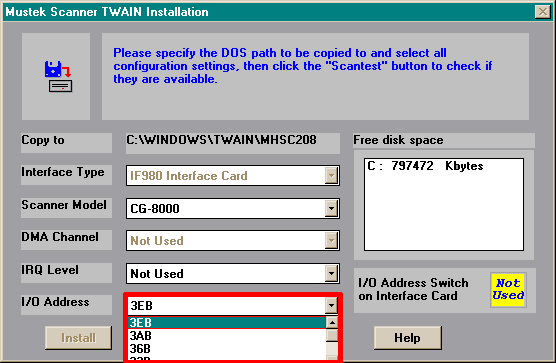
Driver InstallationThe screen below shows the configuration settings during driver installation.This screen was taken from installation with the IF-980 card shown above.Notice that the I/O address can be set right on this screen (outlined inred). It shows IRQ Level as "Not Used" because the latest driversdon’t need an IRQ and DMA Channel as "Not Used" becausethe IF-980 doesn’t use a DMA. The yellow box Says that there is no switchon the card. If you have any card other than an IF-980, it will say thereis a switch used on the card. The driver should automaticall detect theInterface Type. If it gets the card type wrong, you either have a bad addresssetting, the card is not fully seated in the slot or the card may be defective.
If these steps did not solve the problem, call our Technical SupportDepartment for assistance. |
| Mustek and the Mustek logo are trademarks and registered trademarksof Mustek, Incorporated. Any use without the express written permissionof Mustek is forbidden. Other company and product names may be trademarksor registered trademarks. |