 | Document # 3000 |
        |
Cable IssuesFlatbed Scanners With A SCSI InterfaceMake sure that you are using the 5′ or 6′ SCSI cable that came withthe scanner. SCSI devices are very dependent on signal strength and timing.Usinglonger cables changes the signal strength and timing and will frequentlyprevent the scanner from functioning normally. Exceeding 10′ cable lengthis not advisable in any case. If you are using a different cable, try theMustek cable to see if it will work. Mustek’s cables have the number 20276printed on the cable. If you must have a longer cable, contact PrecisionCable at (503) 222-4323. PrecisionCable manufactures a variety of cables to individual order. They arefamiliar with Mustek’s product line. Plug-N-Scan Series ScannersUsing third party cables with the Plug-N-Scan series scanners may degradethe signal strength and therefore the image quality. There are many cablesavailable from retail vendors that have the same type of connectors asthe Mustek cable, but do not have the same pinouts and will not work atall. If you need a longer cable, make sure you get one that conforms tothe IEEE 1284 specification. |
Third Party SCSI CardsMustek owners have successfully installed their scanners using a varietyof third party SCSI cards; however, Mustek’s TechnicalSupport Department does not provide expertise on installation of SCSIcards that did not come from Mustek. If you are using a third party SCSIcard and need help with it you must call the manufacturer of your SCSIcard. If you call Mustek for assistance, please have a Mustek supplied SCSIcard installed in your computer at the time of your call. |
Termination IssuesPC With WindowsMustek’s scanners do not require a SCSI terminator when used by themselves.If you attach the scanner at the end of a SCSI chain, you must attach aPassive SCSI terminator to the second SCSI port on the back of the scanner.Since Mustek’s proprietary SCSI cards do not support additional SCSI devices,SCSI termination is only necessary when using the scanner with a thirdparty SCSI card on a PC. See above paragraph for info on Third PartyCards. MacintoshMustek scanners do not need to be terminated if they are used by themselvesregardless of what the scanner user’s manual might say. If you attach thescanner to a SCSI chain, it will require a terminator if placed asthe last device in the chain. If your installation parameters require a SCSI terminator, contactour Customer Service Departmentto obtain one free of charge. |
Setting The SCSI I.D. #If your scanner attaches to a SCSI interface card, it will have a smallyellow dial on the back that is used to set the scanner’s SCSI I.D. #.It should be set to #6. Each device attached to a single SCSI controllermust have a unique I.D. #. If another SCSI device on your system is setto #6, you must change the scanner’s I.D. #. This situation is rare andusually only happens on Macintosh computers. If you have SCSI I.D.problems on a Macintosh, try setting the dial to #4. |
Removing Previous TwainDriversIt is possible to attach more than one Twain compliant device to a computer.All Mustek scanners are completely compatible with each other, so you canattach several of them to one machine. Other brands of Twain compliantdevices occasionally interfere with the installation of a Mustek scanner.Additionally, some computers come with Twain drivers pre-installed eventhough they don’t come with a Twain device. Below is a list of computersand Twain devices known to cause problems with the installation of Mustekscanners. Twain devices are items such as Scanners, Digital Cameras and Videocapture devices such as Snappy. If you have more than one Twain compliantdevice, you may need to remove the Twain driver for the other device andthen re-install it after you have installed the Mustek Twain driver. When attaching multiple Twain devices to a computer, it is necessaryto configure your Host Application for the device you wish to use. A HostApplication is the Twain Compliant software that you scan into. Some examplesare: iPhoto Plus, Picture Publisher, Text Bridge Classic, Wordlinx, CorelPhoto Paint and Adobe Photoshop. Instructions for Deleting Twain Driversand for Configuring The Host Applications given below. Hewlett Packard ComputersHewlett Packard computers frequently have a driver pre-installed forthe HP Photo Reader scanner even if the Photo Reader did not come withthe computer. If you do have a Photo Reader, it is compatible with yourMustek Scanner. All you need to do is follow the instructions below toConfigure your Host Applications. Hewlett Packard Printer OwnersOwners of Hewlett Packard Printers sometimes have the HP PhotoReader Twain driver installed on their hard drive. Apparently the PhotoReader Twain driver is installed at the same time you load your HP printerdriver. If you do not own the Photo Reader, delete it’s Twain driver asexplained below. Packard Bell ComputersMany Packard Bell computers come with a driver pre-installed for theTop Drawer Scanner. If you own the Top Drawer scanner, it can be used inaddition to your Mustek scanner. Just follow the instructions below toconfigure your Host Application. If you don’t have the Top Drawer scanner,you should delete it’s Twain driver prior to installing the Mustek Twaindriver. Snappy Video Capture DeviceOwners of Snappy occasionally have difficulty installing a Mustek scanner.The solution is to delete the Snappy Twain driver before attempting toinstall the Mustek Twain driver. After the scanner is installed successfully,you should then re-install the Snappy Twain driver. Deleting Twain DriversTwain drivers are stored in files with a .DS file extension.They areusually located in the C:windowstwain directory on your hard drive. Usethe windows 3.x File Manager, the Windows 95 Explorer or MS-DOS commandsto delete any file with a .DS extension. A quick way to delete all twain driver files from your hard drive isto use the Windows 95 File finder. Here’s how to do it. 1. Double click My Computer. 2. Open the View menu and choose Options. 3. Check "Show All Files". 4. Click Start then choose Find Files or folders. 5. In the Named box type in the following verbatim: twain twunk 6. Click the Find Now button. 7. After the search is complete, press the CTRL and the A keys on yourkeyboard simultaneously to highlight all of the files that were found. 8. Press the DEL key on your keyboard to delete the Twain and Twunkfiles. Configuring The Host ApplicationWhen you have more than one Twain device installed on your computer,it is necessary to select the Twain source for the device you wish to use.Most Twain compliant Host Applications have a Select Source command onthe file menu. Some Host Applications have a Setup/Scanner option and othershave a Select Acquire Device option. Ifusing third party scanning software not supplied by Mustek, refer to theprogram’s manual if you are unable to find the Select Source menu command. Once you have found the appropriate menu command, a Twain Source Listwill appear on your screen showing all installed Twain drivers. Selectthe Mustek scanner from the list. If there is more than one Mustek scannerlisted, you installed more than one Twain driver from the Scanner SolutionsCD. |
Obtain The Latest DriverMustek updates Twain drivers frequently in order to ensure compatibilitywith an ever changing variety of scanning software. If you are having difficultyinstalling the Twain driver that shipped with your scanner, you shouldvisit our Driver page and download the latest driver for your scanner. If you are unsure what driver version number you are using, acquireyour scanner through iPhoto Plus or Picture Publisher. The driver versionnumber will be on the Title Bar of the scanning window. |
Selecting Correct ScannerModel When Using Scanner Solutions CDThe Scanner Solutions CD ships with every scanner that Mustek makes.We currently make about 10 different models. The Twain drivers for allof them are on the Scanner Solutions CD. You must choose the correct modelscanner when installing the Scanner Soultions CD or your scanner will notoperate. |
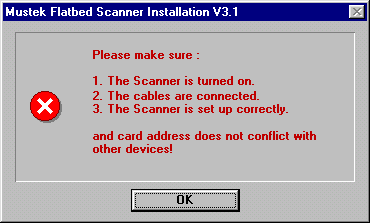
Setting The ScannerCard’s I/O AddressIf your scanner came with a SCSI interface card, you must havean I/O port address available for the scanner. If the address setfor your SCSI card is in use by another device in your computer, youwill get the following error message:
If you have a Plug-and-Scan series scanner and get the above error message,it is because you did not select the proper scanner model number when installingthe Scanner Solutions CD. Mustek flatbed scanners do not use IRQs or DMA channels with the exceptionof the Paragon 1200 SP Pro which requires an IRQ. The 1200 SP Pro comeswith a Plug and Play Adaptec 1502P SCSI Card which will automaticallyset the I/O address and IRQ level for you. The very old AX SCSI Cardsare not compatible with Mustek’s 32-bit Windows 95 Twain drivers. Ifyou have an AX SCSI card, you must purchase a new DTC SCSI cardfrom Mustek’s Customer Service Departmentin order to use 32-bit Windows 95 scanning applications. The old 16-bitTwain drivers that came with your scanner should work in Windows 95 withthe16-bit applications that came with your scanner. AZ SCSI Cards have an addressswitch which is used to set the I/O port address for the scanner. If youare installing Twain driver version 3.4 or later for a Single Pass scanner,you must set the card’s I/O address in two different places. First, setan available address on the card using the three switches. Then set theexact same address on your computer’s monitor during installation of theTwain driver version 3.4 or later. The newer DTC SCSI Cardsallow the address to be set during installation of the driver by selectingan address from a list appearing on your computer’s monitor. For more detailedinstructions on setting the address for your SCSI card, click thelink below to see Document # 3010 – Interface Card Issues. |
[3010] InterfaceCard IssuesClick the above link to see a document that thoroughly addresses interfacecard issues. |
| Mustek and the Mustek logo are trademarks and registered trademarksof Mustek, Incorporated. Any use without the express written permissionof Mustek is forbidden. Other company and product names may be trademarksor registered trademarks. |